Abdulali Ibrahim · · 13 min read
Open my About page in Swiss Editorial, then open it in Engineering Notebook. Look for the degree and the university. The information is identical. Look at where your eye goes on the way there. The navigation, the shape of the text, and the relationship between the page and its margins change. You can send either address to someone who has never visited the site.
I wanted that experiment to survive the next correction to my biography. If I had to remember which layouts contained the old wording, I would eventually publish different versions of the facts. The more interesting challenge was to let a design change quite radically while keeping an article link, a search result, and a line in my education record trustworthy.
This page is part of the experiment. Its words started in a Markdown file. The layout around them came from a separate file picked for the current edition. Here is what has to happen for those files to meet, and what can go wrong along the way.
Follow one fact to the screen
In content/profile.json my education is a small record. It contains a degree, a university, and a period. There is no column number, color, heading size, or instruction to put the dates before the university. When the publisher builds the About page it validates that record and includes it in the page data. At that point the code knows what information is available and which public path identifies the page. It has yet to choose a layout.
The next input comes from presets/<edition>/about.json. The edition declares a component tree with references to sections such as the biography and the technology index. The renderer binds the canonical page to those sections. Finally, the catalog's Angular component reads the education fields and renders headings and text. An edition can put my background alongside my technical interests or give the story a wider reading column. Correct the university in the profile, build again, and each arrangement carries the correction.
That division suggests a practical review question. If someone translates a date into a pixel position while editing my profile, the content file has acquired a layout responsibility. If someone types the university name into an edition, the layout has acquired an editorial responsibility. Catching either mistake in a small diff is easier than finding two disagreeing About pages after launch.
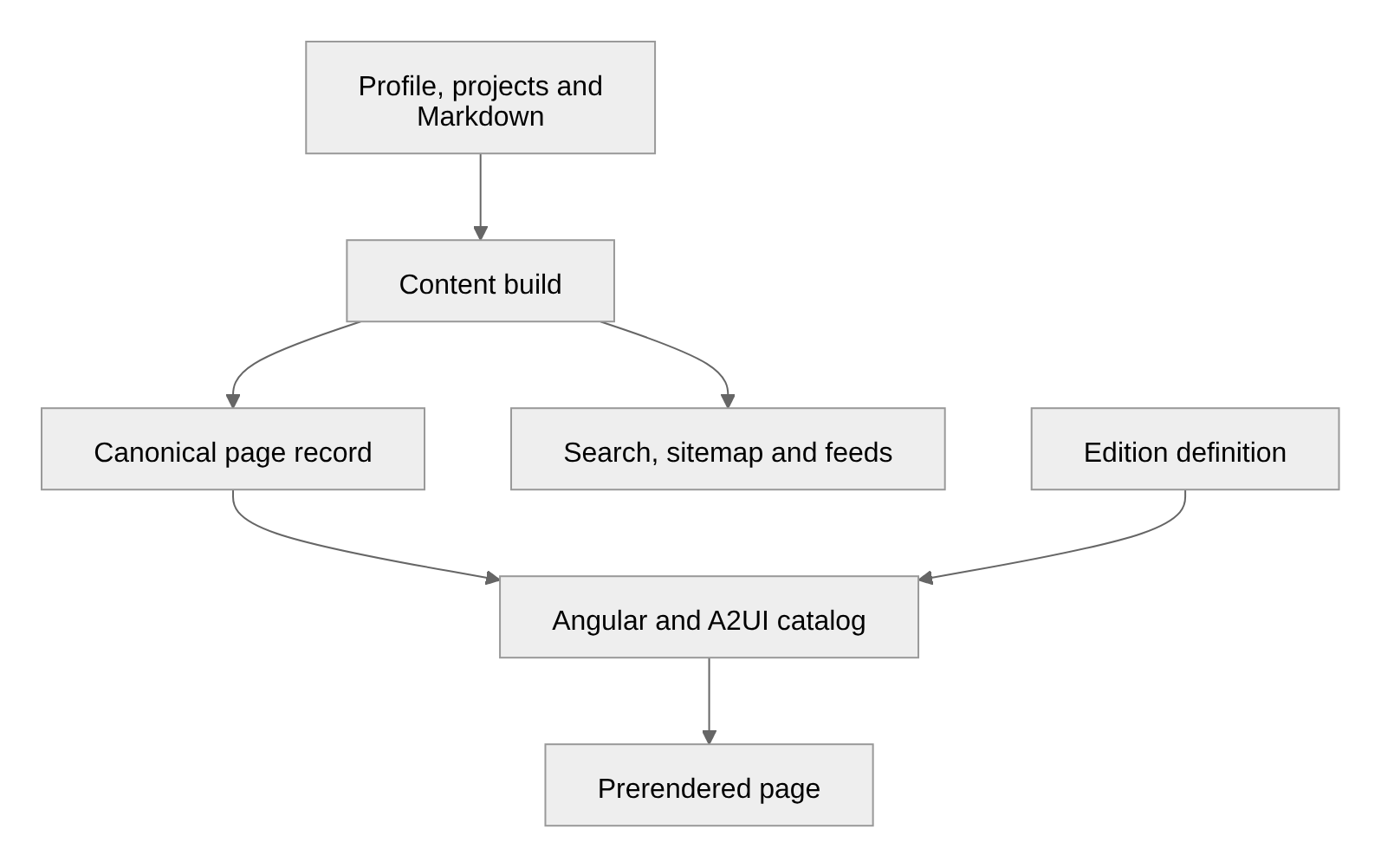 View full-size diagram
Diagram source
flowchart TD
  accTitle: Profile, project records and Markdown produce page data. Page data and an edition definition meet in the Angular renderer, which produces the page HTML.
  sources[Profile, projects and Markdown] --> publisher[Content build]
  publisher --> page[Canonical page record]
  publisher --> discovery[Search, sitemap and feeds]
  page --> renderer[Angular and A2UI catalog]
  edition[Edition definition] --> renderer
  renderer --> html[Prerendered page]
What a design file can say
A theme can take you a long way. Colors, type, and contrast can all change without disturbing a paragraph. My first two editions also needed to disagree about the order of things. Swiss Editorial presents a project index high on its homepage. Engineering Notebook makes room for a technical index and puts its masthead inside a rail. A single template with conditions at each point of disagreement would make a third layout an exercise in figuring out which conditions still applied.
The unit of composition here is a section a reader would recognize. In a home definition, one entry in the A2UI component list looks like this.
{
  "id": "projects",
  "component": "SiteBlock",
  "kind": "projects",
  "data": { "@path": "/page" }
}
The ID lets a parent include this section in its ordered list of children. The catalog resolves SiteBlock to an Angular component; kind selects the projects branch of its template. The binding reads the page object from the surface’s data model. Adding a project changes the records the block receives. Moving the list above the introduction changes only the order of two child references.
The definition controls where the technology index appears; the catalog controls its markup. Keeping that boundary means a new interaction still needs Angular code. The alternative would be to encode event handlers and template logic in JSON and debug them without Angular’s template checker.
Where Angular ends and A2UI begins
Angular suited this project because a router, a server-rendering pipeline, a template checker, and an official A2UI renderer could all participate in the same application. For example, when I change the shape of an article I can check the Angular template that reads its date and tags. A saved JSON definition still needs runtime validation. TypeScript cannot vouch for a file simply because the application fetched it from the expected directory.
A2UI gives the site a vocabulary for creating a surface, populating its data model, and describing its components. Each edition stores two versioned messages, createSurface and updateComponents. Between those operations the host supplies the current page with updateDataModel. In the real call to the renderer, that middle message is just this small object.
{ version: '1.0', updateDataModel: { surfaceId, path: '/', value: this.model() } }
The value at the root is an object with a page property. That small detail explains the slash in @path: /page. A binding to a different path might be perfectly reasonable in another application and still mean nothing here. The site validates the binding shape, then lets the official processor resolve it. There is no second path interpreter in the templates.
The catalog registers SiteLayout and SiteBlock with Angular implementations. A layout with the role main produces the actual main landmark. It asks the renderer's component host to render each referenced child. A bound block receives the resolved object and hands it to trusted Angular code for the requested section. Search and theme controls dispatch named actions that the host recognizes. A visitor can trace any visible control to code in this repository. The site reads saved messages and uses no model service to compose a response. A2UI catalogs
For a portfolio with one layout I would use ordinary Angular templates. Here I wanted to see which decisions an edition could make without changing the application. A2UI supplies the bindings and surface lifecycle; the site still owns routing, preferences and every section a visitor sees.
When inputs change, the host gives the next surface a fresh ID, sends its three messages, replaces the displayed ID, and deletes the previous surface. Every edition can have a block called projects without sharing its live component instance. That matters when the new tree puts the section under a different parent.
A link has two kinds of state
Suppose I send you /about?design=engineering-notebook. I have expressed two intentions. I want you to read the About page, and I want you to see one particular presentation. If the presentation cannot load and you can still read my background, the link has done most of its work. Redirecting you to the homepage would lose the more important half.
An explicit, enabled design in a URL takes precedence over a saved preference. Without that request, a visitor can keep a preferred edition or allow the site to choose. The selection code excludes the last choice when alternatives exist. That makes shuffling useful even with a short list. A dark theme is a separate preference. Choosing a technical layout says nothing about the lighting in the room or the visitor's preferred contrast.
The browser's back button is another consumer of this state. Following a project link and returning should restore the edition associated with that history entry. The app saves the edition ID in history state and also preserves an explicit design query on its internal navigation. A shared URL and a local trip through browser history have different lifetimes. Browser history alone cannot tell a second person's device which design I intended to send.
There is a timing detail behind the design switch. The requested stylesheet and definition can finish loading after the visitor has chosen a newer edition. The route view guards the pending operation so an old completion cannot take over the screen. It waits for the stylesheet and the definition before applying the alternative. If a requested definition fails validation, the registered fallback gives the route a known presentation. That behavior is worth testing with a failed request injected into the browser. A successful local load exercises none of it.
The first response already picked an edition
A browser can read a saved preference. A plain static host receives an HTTP request and serves a file. It cannot read local storage while composing that file. For the portable build, I let Angular prerender a complete fallback document. A reader can follow the text and ordinary links before the client starts. An alternative chosen during initialization can still change what that reader sees. Waiting for both of its resources avoids an unstyled alternative, but the initial fallback can be visible on a slow connection.
Hydration makes the order important. Angular reuses the DOM produced on the server and attaches the client application to it. If the browser independently rolls a random edition before that initial pass, it might expect a navigation rail where the server emitted a masthead. No amount of theme CSS resolves two different trees. The route passes page data and the resolved definition through Angular's transfer state. Preference initialization can then happen after the initial render. Angular hydration guide
The optional variants build takes a different approach to the first response. It renders a separate file for each enabled edition of each route as well as the portable pages. An edge handler can serve the file for the appropriate edition at the public address. The rendered edition ID travels with that document so the client can start with the same choice. This arrangement buys control over the first paint at the price of more files, longer builds, and deployment rules that need testing on the actual host.
There was a concrete server-side integration detail, too. The renderer's dependency graph references DOM globals during module loading. The server entry initializes Angular's server DOM before loading the renderer. The first import in src/main.server.ts is import '@angular/platform-server/init';. The check on that decision is the output file. I can open the generated article HTML and find the title, headings, and paragraphs before any browser code has run.
Publishing this article
To add an article I give a Markdown file a title, slug, description, author, publication date, and a handful of classification fields. Its slug supplies the address. Changing a title can be an ordinary copy edit. Changing the address deserves a redirect, since a bookmark, an old feed entry, or someone's reading notes may already point to it. Previous slugs can be recorded as aliases and emitted as redirect mappings for the host.
The publisher discovers the files, checks their front matter, and sorts the collection by date with the slug as a tiebreaker. For production it selects articles marked published whose dates have arrived in UTC. A scheduled article becomes available on the next qualifying build. Crossing midnight on an otherwise idle static server changes nothing. When a post is withdrawn, stale page data must disappear from the new artifact as well as from the list on the blog homepage. Deploying the finished artifact as a unit matters for exactly that reason.
The article body goes through Markdown parsing and sanitization before the compiler adds trusted presentation markup. A heading gets a stable fragment derived from its text. The table of contents uses the same ID. A highlighted code block arrives as HTML from Shiki, complete with the original code text for copying. A Mermaid fence is rendered offline to an image at build time. The diagram above has a text alternative and its source can be expanded. The browser does not need to download a diagramming engine to read this paragraph.
There is a privilege implied by that compiler. The reader accepts its generated HTML so it can display code, tables, and math. That makes the origin of the HTML important. The reader takes it from the compiled article in the resolved route. Publishing a new component definition does not give that definition permission to inject a string of markup. An editor preview and a production build must use the same sanitization path, since a draft is still opened by a real browser.
Once the page exists, several other views can derive from the same record. The blog index links to it. A tag can collect it with other writing. A feed reader needs its publication date and canonical address. A search result needs its title, description, and a way back to the full text. Those outputs should agree even when an article is renamed, rescheduled, or taken out of production. That is why the eligibility decision belongs in the publisher rather than in a condition inside a blog card.
A crawler gets the same article
The site has far more visual states than editorial identities. A design query can choose the layout around this article. The canonical URL identifies the manuscript without that presentation parameter. Page titles, descriptions, sharing data, and article metadata come from the route's canonical record. A search index entry points to the public address. Someone arriving from search remains free to choose an edition afterward.
I like to check these details without opening the application. Fetch a generated article document and read its title and canonical link. Find a sentence from the middle of the story. Look for the article URL in the sitemap and the feed. Request a path that does not exist and inspect its HTTP status as well as its title. A friendly missing-page design served with a success status would tell a person and a crawler different things about the same request.
A project like this has one particularly easy deployment mistake. The internal addresses used to store edge variants can look like another set of pages to publish and promote. They are an implementation detail. The handler selects an internal file while the visitor stays at the public address. If the hosting layer rewrites every miss to the homepage, or caches the wrong variant for every subsequent visitor, the local rendering code cannot repair that response before it reaches the browser.
Testing the differences that matter to a reader
I check the prerendered page and the interactive page separately. With JavaScript disabled, the biography should still be readable and the project links should still work. With JavaScript enabled, I can follow a link in one edition, switch editions, and go back. That tests whether the router restores the right layout as well as the right URL. Neither check tells me whether a long heading fits on a phone; for that I want the rendered page at a narrow width.
Performance has a similar distinction. A portable page can send useful HTML quickly and still spend time fetching the alternate design requested in the URL. A gallery deliberately shows previews of several editions. A reader following a normal article link has no use for the full stylesheet of every edition. I would measure those paths separately. A local Lighthouse run can put a number on a simulated visit. It cannot establish how long a real reader in Baghdad, or anywhere else, waits for a tap to take effect.
What I would keep if I built it again
The part I value most is a mundane edit. I can correct my degree without opening a design file. I can move a project section without revisiting the sitemap. When I add a piece of writing, the difficult work concerns what it says, who it is for, and whether I want it published. The layout can change again without asking me to answer those questions twice.
There is still a cost to every new edition. Someone has to read a long title in it, navigate it on a phone, try the keyboard, and check a real article with a table or a diagram. A registry entry and ten valid definitions buy a working starting point. They cannot establish that a stranger will enjoy reading there. If the gallery grows much larger, I would first measure the build cost of generating every variant and the time spent reviewing them. That evidence would tell me whether to change the build, narrow the set of editions offered at the edge, or spend more time on the designs already here.